Who are We?
The Iraqi Pharmacovigilance Center, within the Ministry of Health / Directorate of Technical Affairs, and as part of the WHO Programme for International Drug Monitoring (PIDM), is the national authority responsible for monitoring the safety of medicinal products in Iraq. The Center receives and analyzes reports of adverse drug reactions, medication errors, and other drug-related problems, detects early safety signals, and takes risk-minimization actions, including appropriate regulatory measures in coordination with the relevant health authorities, to promote the safe and rational use of medicines and protect public health.
Frequently Asked Questions
Enter the basic information: the medicine name, dosage, dates, side effect, and any available test results. Add a contact method for follow-up if needed (kept confidential).

- Suspected side effects from any medicine or vaccine (such as skin rash, injection reactions, dizziness — even if you’re not sure of the cause).
- Quality issues (color or smell changes, damaged packaging, difficulty opening, or reduced effectiveness).
- Medication errors or drug interactions that may affect patient safety.
In case of severe symptoms (such as shortness of breath, chest pain, bleeding, etc.), go to the emergency room immediately.
Anyone (whether a patient, caregiver, or someone close to the patient) can report side effects.
These reports help identify new adverse reactions and gather more information about known ones, improving medicine safety overall.
We may contact you for additional information if needed to help assess the case.
Reports are reviewed by the Pharmacovigilance Center and securely stored in the national database to support medicine safety improvement.
Yes, report any suspected side effect.
Every report makes a difference
Access the form to document side effects and treatment-related issues.
Steps to Install the Form as an App
On Android
1- Visit the form at:
https://vigiflow-eforms.who-umc.org/iq/iqadr
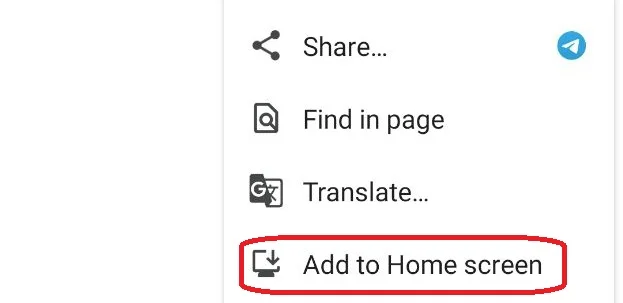
2- Tap the three dots in the corner of your browser
3- Select “Add to Home screen”
4- A new icon will appear on your home screen for quick access.
On iPhone
1- Visit the form at:
https://vigiflow-eforms.who-umc.org/iq/iqadr
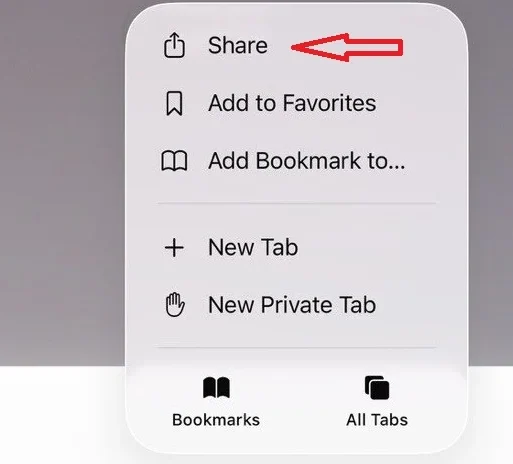
2- Tap the Share button at the bottom of the page
3- Select “Add to Home Screen”
4- A new icon will appear on your home screen for quick access